
Introducing Tapify 2.0

Dirk ter Horst
Founder, Tapify

Today, we’re launching Tapify 2.0, a new native app for sharing who you are, capturing who you meet, and remembering the context around every introduction.
It is the most significant change we have made to Tapify. What began as a digital business card has become a system for keeping track of the people you meet.
The other side of the introduction
When I started Tapify, I was focused on a visible problem: the paper business card had stopped making sense.
It runs out, becomes outdated as soon as your role or number changes, and often disappears into a pocket before anyone saves the details. The object remained familiar, but the experience no longer matched how we communicate.
We built Tapify to make sharing simpler. You could create one digital business card, keep it current, and share it by QR code, NFC, Wallet, or link. The person in front of you could open it immediately, without downloading an app or creating an account.
That idea resonated. More than 10,000 people now use Tapify to share their details.
As the product grew, it revealed a limitation in how we had thought about networking. We designed Tapify around the moment someone opened your card. In the product, the exchange was complete. In real life, the relationship had only just started.
The other person’s details could still end up on a paper card, in a photo of an event badge, or in a contact record with no indication of where you met. Even if you saved their name and number, the meaningful part was left to memory: what you discussed, why it mattered, and what came next.
We had made it easier for people to remember you. Tapify did not yet make it easier for you to remember them.
That was the realization behind 2.0. The problem was no longer just how to replace a paper card. It was how to preserve the full introduction.
A business card should work both ways
A business card traditionally answers one question: how can someone contact me?
A meaningful introduction raises a second question: how will I remember them?
Both sides matter. Sharing your identity should be fast and polished. Capturing the other person should be just as easy. When you return days or months later, you should have enough context to continue the conversation naturally.
Tapify 2.0 is built around that complete exchange. It brings four changes together:
- A new native app for iPhone and Android, designed for the moment you meet someone.
- A universal scanner for paper business cards, event badges, and QR codes.
- A richer contact system with AI enrichment, notes, tags, and sources.
- A connected team workspace for shared contacts, central card management, analytics, and CRM workflows.
Together, they form one sequence: share, capture, understand, and follow up.
A new native Tapify
The original Tapify was built around the web. That remains the right place for someone to receive your card: a link opens instantly, works across devices, and requires nothing from the recipient.
But the person sharing the card has different needs. You need your QR code before the moment becomes awkward. You need a camera that is ready to scan. You need contacts and notes while you are moving between conversations. Those interactions belong on the phone.
Tapify 2.0 introduces fully native apps for iPhone and Android, organized around three simple spaces: Card, Scanner, and Contacts.
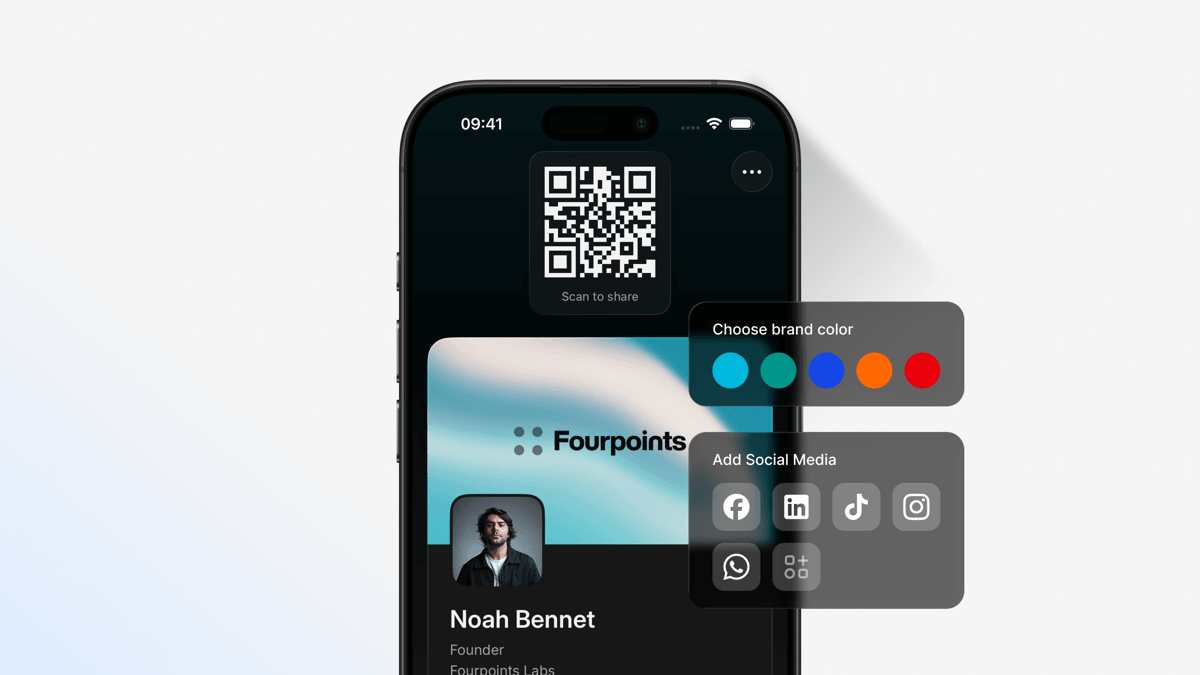
Card is where you create and manage how you appear. Scanner captures the person in front of you. Contacts keeps the people you have met and everything you want to remember about them.
Moving between those spaces is intentionally straightforward. There is no setup before every interaction and no workflow to memorize. Open Tapify and the action you need is there.
The app also brings Tapify closer to the surfaces built into your phone. Keep your card in Apple or Google Wallet, use a home-screen widget, open your QR code from Control Center, or share from Apple Watch. On Android, native shortcuts and widgets keep your card close at hand.
The aim is not to make your phone part of the conversation. It is to make the mechanics of exchanging details disappear into the background.
Your card, ready for every introduction
The digital business card remains the starting point of Tapify.
Bring your name, role, company, contact details, links, and social profiles together on one page. Choose what people see and present it in a way that feels like you. For teams, each card can reflect the company you represent.
When it is time to share, use the method that fits the moment:
- Show your QR code from the Tapify app or a home-screen widget.
- Add your card to Apple or Google Wallet.
- Share from Apple Watch when your phone is not in your hand.
- Send your personal link before or after a call.
- Tap a Tapify NFC card against a compatible phone.
Every option points to the same live profile. Update Tapify once, and the next person who opens your card sees the current version, however you shared it.
The recipient still does not need Tapify. Your card opens in their browser, where they can save your details or share their own. No compatibility instructions or account stands between the introduction and the exchange.
We wanted 2.0 to add more capability without losing this simplicity. A good networking product should support the conversation, not take it over.
Capture whatever you are handed
There is no single standard for how people exchange information.
At the same event, one person might hand you a business card, another might show a QR code on their badge, and a third might ask you to find them on LinkedIn. Keeping those contacts has meant switching between a camera, notes, a browser, and your address book, or promising yourself you would organize everything later.
Tapify 2.0 introduces a universal scanner built for these mixed, real-world moments.
Point the camera at a paper business card, event badge, or supported QR code, and Tapify turns the available details into a contact you can review and save.
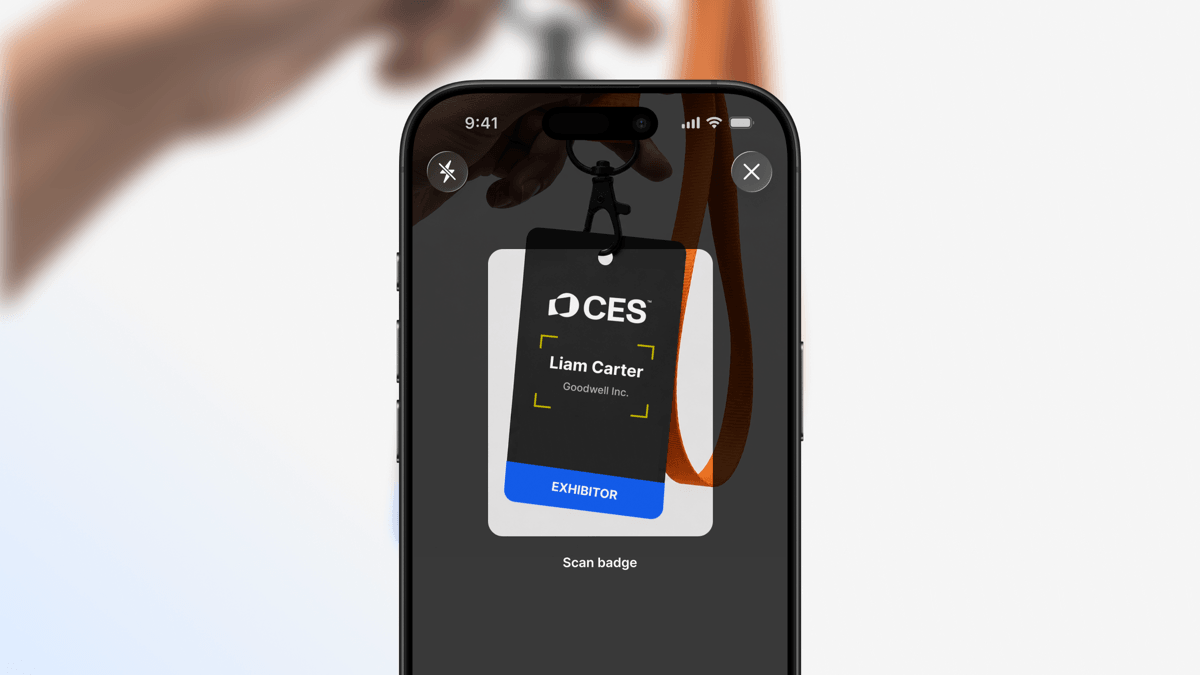
Because cards and badges vary, Tapify shows the captured information before saving it. You can correct or add anything while the person and conversation are still fresh.
When someone opens your Tapify card, they can also share their details back through the profile. Neither of you has to type into the other person’s phone.
Different inputs now lead to the same place. Whether the introduction starts with paper, a badge, a QR code, an NFC tap, or a shared link, it ends as an organized contact in Tapify.
From a scan to a useful contact
Capturing a name and email address solves the data-entry problem. It does not necessarily tell you who the person is.
Before following up, people often search for the company, look for a current job title, find the right website, and try to match a social profile. The work is small for one contact and exhausting after a full day of meetings.
AI enrichment in Tapify 2.0 fills in missing professional details such as job title, company information, websites, and social profiles.
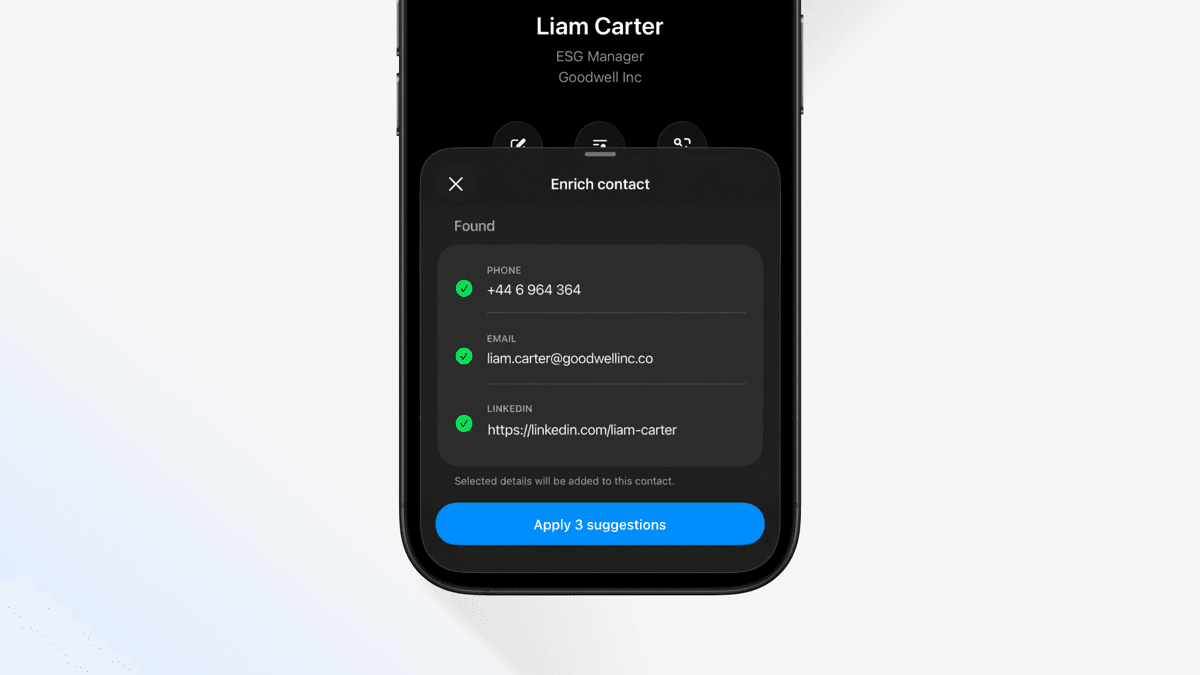
The result is a contact you can understand at a glance, so you can focus on what is useful to say instead of reconstructing basic information across several tabs.
Enrichment supports the relationship, not a database for its own sake. You review the details and control what becomes part of the contact. Tapify handles the repetitive research; the judgment stays with you.
After a busy event, ten incomplete scans no longer become ten research tasks before anyone can follow up.
Remember more than a name
The most valuable detail from a meeting is often something no scanner can capture.
It might be a challenge they mentioned, a market their team is entering, or an introduction you offered to make. Those details explain why you saved the contact. Without them, even a complete address-book entry can feel anonymous.
Tapify 2.0 keeps notes, tags, and sources with the person they belong to. Add a short note immediately after the conversation. Record where you met. Use tags to organize contacts around an event, relationship, or next step.
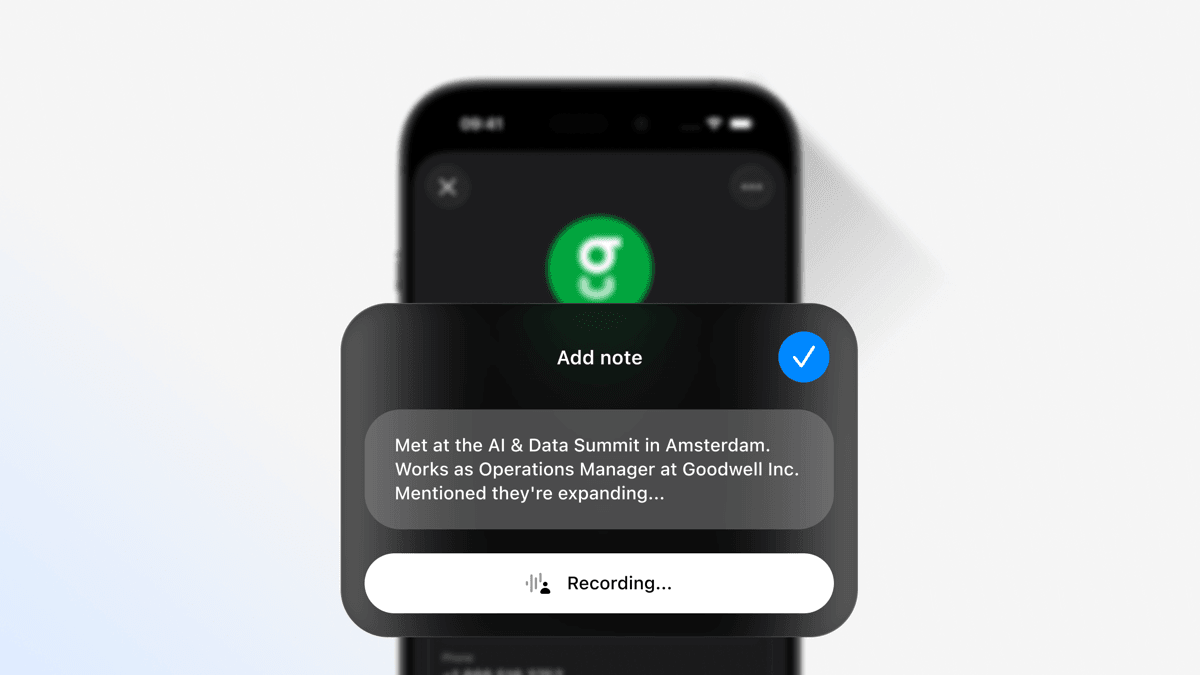
When it is time to reach out, you can continue from the actual discussion instead of writing “Great to meet you” and hoping they remember. The relevant details survived the gap between meeting and message.
All captured contacts live together in the app. Review their details, add context, or send your own card after the introduction. Tapify is the place to return to when you remember the person but not every detail.
It is deliberately lightweight: not every conversation becomes a sales opportunity. Tapify simply keeps the information you already intended to remember.
One flow, instead of several disconnected tools
Each capability in 2.0 is useful on its own. The larger change is that they now work as one flow.
You share your card without leaving Tapify. You scan what you receive into the same app. Enrichment adds the missing professional context. Notes preserve what happened in the conversation. The contact is ready when you follow up, save it to your phone, or move it into another system.
Previously, those steps were spread across different places: a QR code in a wallet pass, a paper card in your camera roll, background information in a browser, and notes in another app. No single step was difficult; the context kept breaking between them.
Tapify 2.0 connects the sequence, so nothing needs to be reconstructed later.
A shared memory for teams
For an individual, losing the context from an introduction is frustrating. Across a company, it becomes an operational problem.
Teams meet customers, partners, candidates, and suppliers everywhere. The resulting contacts are scattered across employee phones, paper cards, spreadsheets, and inboxes. Marketing cannot see what an event produced, sales may not know who owns the follow-up, and relationship history can leave with an employee.
Tapify Teams brings identity, contact capture, and follow-up into one shared workspace.
Keep every card on brand
Admins can manage digital business cards for the whole team. Brand settings, templates, and field controls keep every card consistent without asking each employee to maintain their own.
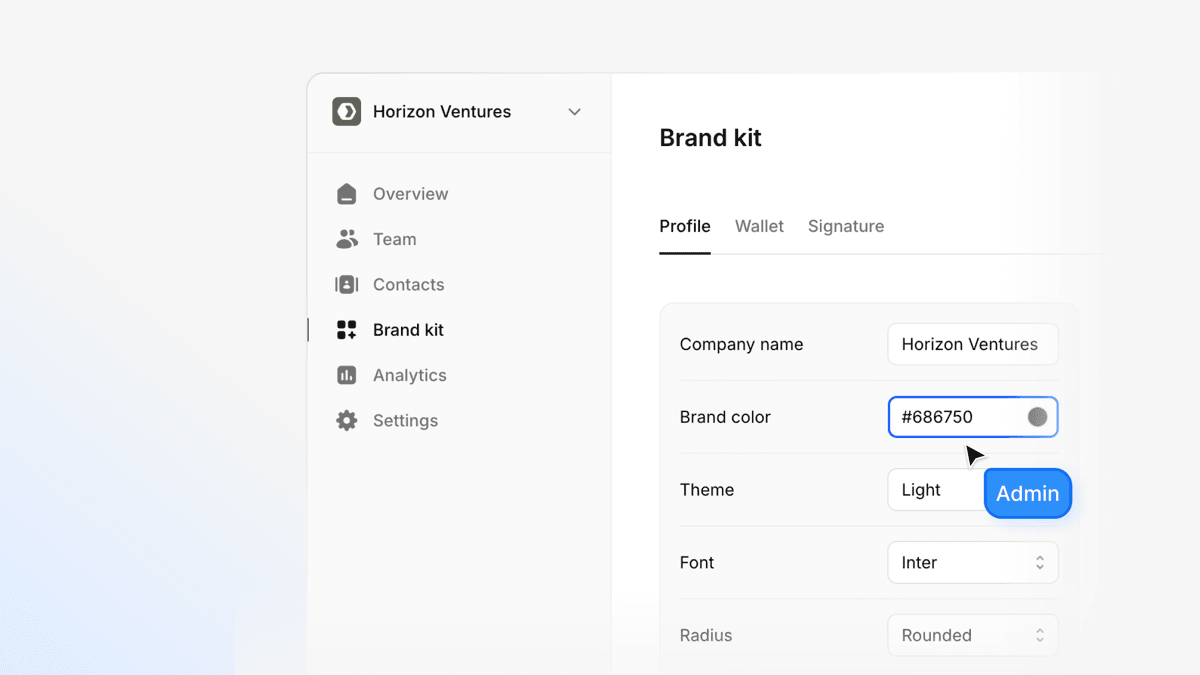
Profiles can be updated centrally, team members added in bulk, and access removed when someone leaves. The company stays in control of its brand and the networking data created through work.
Team members still share naturally from the native app while the organization manages the structure behind it.
Capture contacts together
Contacts collected by team members appear in a shared dashboard with who captured them, how they were captured, and the context added during the conversation.
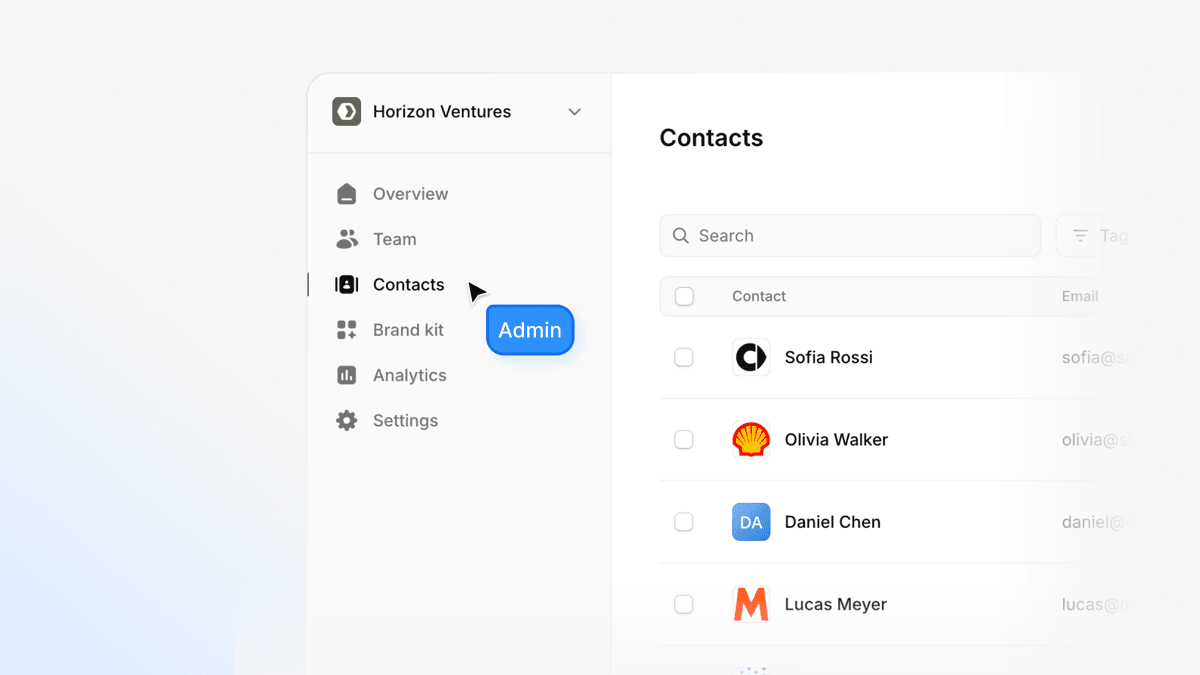
This gives teams a common view without extra reporting. After an event, there are no stacks of cards to gather or spreadsheets to complete. The contact exists, its source is attached, and the notes are ready for whoever takes the next step.
Shared contacts also clarify ownership. A colleague can understand the relationship before taking over, and its context remains available to the organization.
Connect the tools that come next
Tapify is often the first system to receive a new contact, but it should not be the last.
With our Zapier integration, teams can send enriched contacts to HubSpot, Salesforce, Attio, or the rest of their workflow. Notes, tags, and sources move too, so the CRM receives more than the details printed on a card.

Teams can also export contacts as CSV or build custom connections with workspace APIs. Tapify does not replace the systems that manage your pipeline; it improves what enters them and removes the manual work in between.
Understand what networking creates
The shared workspace also gives teams visibility into card views, saves, captured contacts, sources, and activity across the team.
These signals answer practical questions: Did the event generate new conversations? Which sharing methods are being used? Are contacts captured with enough context to follow up? The goal is a clearer picture of whether networking activity is leading somewhere, not to turn every interaction into a dashboard.
Together, central card management, shared contacts, integrations, and analytics make Tapify Teams a system for the relationship workflow, not just a way to distribute matching business cards.
More capable, without becoming more complicated
Tapify 2.0 changes the scope of the product, but not the principles underneath it.
The recipient still needs no app or account. One live profile powers your QR code, link, Wallet pass, and NFC card. You control what you share and save, and a physical Tapify card remains optional.
These details matter because networking happens in short, social moments. There is rarely time to explain an interface or troubleshoot compatibility. The product has to be ready, understandable, and quick enough to stay out of the way.
We built scanning, enrichment, contacts, team workflows, and integrations around that constraint. Tapify now does more after an introduction while keeping the introduction simple.
Available today
Tapify started as a better way to share a business card. With 2.0, it becomes a better way to remember the people behind them.
Tapify 2.0 is available today for individuals and teams. Download Tapify for iPhone, or visit the download page to get Tapify for your device.
For your company, explore Tapify Teams or contact our sales team.