
What is a digital business card and how does it work?
A digital business card is an online profile with your name, contact details, and links. You share it through a QR code, personal link, or optional NFC card. The other person opens your profile on their phone to view and save your details. With Tapify, the recipient doesn't need to install an app or create an account.
What goes on a digital business card?
Think of a digital business card as a personal page for introductions. It shows who you are, what you do, and how to reach you. Someone can tap your phone number, visit your website, or save your contact details.
A card usually includes:
- Your name, job title, and company, so people know who they have met.
- A photo and company logo, to make your card recognizable.
- Your work phone number and email address, so they can contact you.
- Your website and relevant links, such as LinkedIn, a portfolio, or a booking page.
Choose what someone will need after your conversation. A photographer might link to a portfolio. A consultant might include a way to book a meeting. You don't need to add every social media account you have.
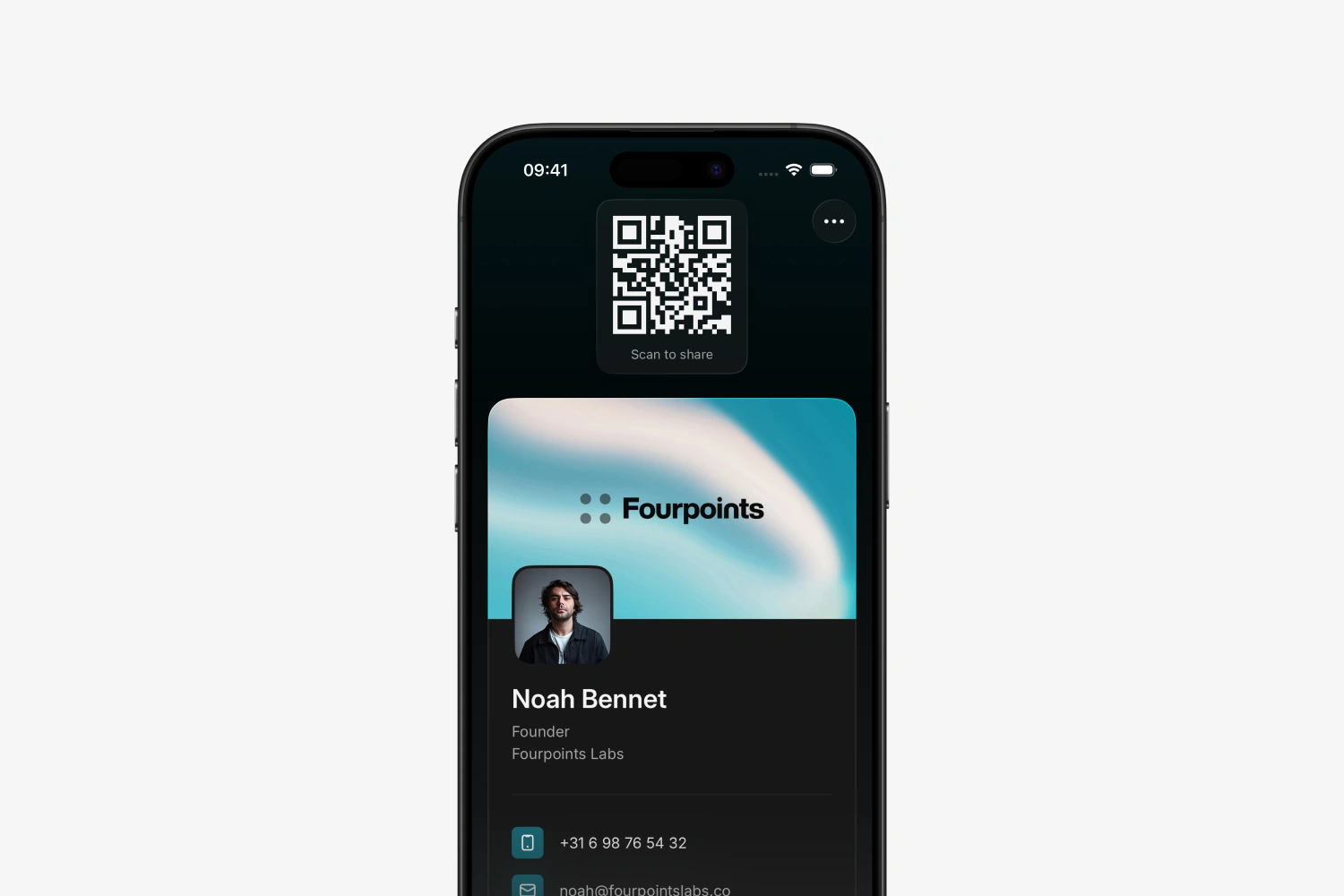
An online business card has its own link. A QR code or NFC card can point to that page. A vCard is the contact file someone uses to save your details in an address book.
How does a digital business card work?
Suppose you meet someone at an event and want to stay in touch. With a digital business card, the process has three steps.
1 Share your card
Open your QR code on your phone. The other person points their camera at it and taps the link that appears. You can also send a link or hold an NFC card near a compatible phone.
2 They open your profile
Your digital business card opens in their browser. They can see your name, company, contact details, and links. With Tapify, the recipient doesn't need an app or an account.
3 Save the details
The recipient can view your details, open a link, or use the contact-sharing option. Scanning a card doesn't automatically save a contact. That takes a separate action on their phone.
With Tapify, the recipient first fills out the contact exchange form. They can then save your contact:
- The recipient taps Exchange contact details.
- They enter their name and can add an email address, phone number, and other details.
- After they select Share details, the information appears in your Tapify contacts.
- They can then select Save contact and confirm saving your details in their contacts app.
This gives both of you a way to continue the conversation. If you've agreed to send something, ask them to include an email address. A name alone won't tell you how to reach them.
Your details are saved through a contact file, also called a vCard. The steps can look different on each phone. Learn more about opening and saving a vCard.
How do you share a digital business card?
You can share the same online card in several ways. Choose the one that suits the situation.
| Sharing method | How the other person opens your card |
|---|---|
| QR code | Scans the code on your screen or printed material and opens your profile. |
| NFC card | Holds a compatible phone near your physical card and opens the notification. |
| Personal link | Opens your card from a message, email, or anywhere else you share the link. |
| Apple Wallet or Google Wallet | Scans the QR code you display from Wallet on your phone. |
In person: QR or NFC
A QR code lets you share from your phone. The other person uses their camera. If they need help, see our guide to scanning a QR code.
An NFC business card is a physical card with a chip that can open your online profile. You keep the card and use it for your next introduction. Buying one is optional; you can use a digital business card without it. Our NFC guide explains how it works and which phones support it.
Remotely: a link
After a video call, put your profile link in the chat. Or add it to your email signature so recipients can find your contact details in one place. They can open it without scanning a code.
From Wallet: your QR code within reach
You can add your Tapify card to Apple Wallet or Google Wallet. At your next introduction, open Wallet and let the other person scan the QR code. This uses the code on your screen, rather than contactless sharing between two phones.
What are the benefits of a digital business card?
A digital business card is useful when you meet people regularly or your details change.
- Keep your online details current. Update your job title or phone number without printing new cards.
- Share the same profile in several places. The QR code on your phone and the link in your email can point to the same page.
- The other person can contact you. They can visit your website, call you, or save your contact details without typing everything out.
- Receive their details too. A contact form, like the one on a Tapify card, lets someone share their information with you. This happens when they submit the form.
Do saved contacts update too?
Your online profile and a saved phone contact are separate. If you change your phone number in Tapify, your profile shows the new number when someone opens it again. Your profile link stays the same when you make that change.
If someone previously saved your details as a vCard, their address book still contains the old copy. It isn't automatically overwritten. Share your new details or ask them to update the contact.
What are the limitations?
A digital card doesn't replace the conversation or the follow-up. Give the other person time to open your card and agree on how you'll stay in touch.
Keep these points in mind:
- Your online profile needs internet access. The recipient needs an internet connection to open the page behind your QR code. If reception is poor, send the link for them to open later.
- NFC doesn't work with every phone. Use a QR code or link if a phone can't read NFC tags or doesn't respond to your card.
- Your profile depends on a service keeping it available. Check what happens to your card and data if you cancel a subscription or delete your account.
- You choose which details to share publicly. Someone can forward your profile link. Include information you're comfortable sharing beyond the conversation, such as a work number.
You can also combine paper and digital cards. A printed card with a QR code gives people access to your online profile. Updating the profile won't change any details printed on the physical card.
Who is a digital business card useful for?
Freelancers and professionals can keep their contact details and work in one place. After an introduction, the other person can find them again and open the link relevant to their conversation.
At client meetings and events, a card with a contact form helps you collect the other person's details too. Add a note afterward about what you discussed or agreed to do. It gives you something specific to refer to when you follow up.
For companies, central management can be useful. With Tapify Teams, administrators can manage employee cards and branding. When choosing a service for your company, consider how you'll update details, add employees, and manage the contacts your team collects.
How do you create a digital business card?
Start with the details you want to share. You can add more or make changes later. Here's how to get started with Tapify:
- Download Tapify and create an account. You use this account to manage your card. The recipient doesn't need one.
- Enter your name, job title, and company. Add the contact details you want to use for work.
- Make the card recognizable. Add a photo, your logo, and relevant links, then customize the look of your card.
- Review your card as a recipient. Open the profile link in a browser and check your details and links.
- Try sharing it with someone. Have them scan your QR code and go through exchanging and saving details together. You can then add your card to Wallet or connect an NFC card.
You don't need to wait for a physical card to get started. Visit our digital business card page to create your own with Tapify.
How much does a digital business card cost?
Options include free digital business cards, paid subscriptions, and physical NFC cards sold separately. Consider whether you need to share your own details, use more contact features, or manage cards for a company.
With Tapify Free, you can create one digital business card. You can edit your profile and share it as often as you need through a QR code, link, or standard Apple Wallet or Google Wallet card. You don't need to buy an NFC card.
Tapify Pro offers more customization and contact features. Teams is for companies that want to manage employee cards and their contacts centrally.
A Tapify NFC card is a separate purchase and doesn't require a paid subscription. See current plans and pricing to compare features.